Derivatives:
Using the TI-83 or higher, approximate f'(0.75) for f(x)= 0.5x3 + 2x + 0.69
Then calculate the actual value of f'(0.75) and compare this with the approximation.
First graph f(x)= 0.5x3 + 2x + 0.69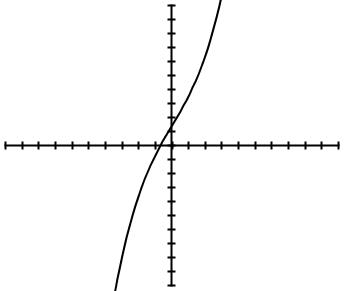
Approximate f'(0.75) on the calculator
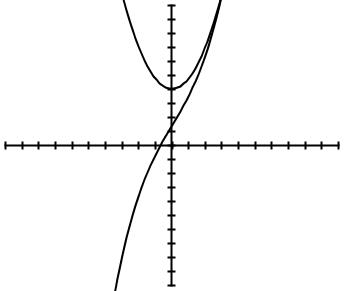
Calculate the exact value of f'(0.75)
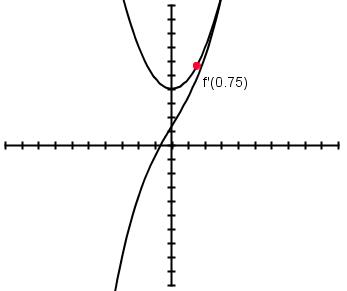
--------------------------------------------------------------------------------------------------------------------------------------------------------------------------------------
Integrals:
Using the TI-83 or higher, find the area between the curves f(x)= x3-3x +1 and g(x)= 2sin(x).
First graph f(x) and g(x)
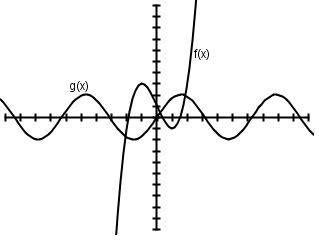
Find the solutions to the system of equations; in other words, find where the functions intersect
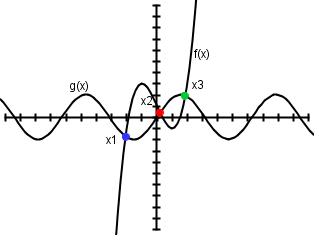
x1 = -2.0788
x2 = 0.2022
x3 = 1.8678
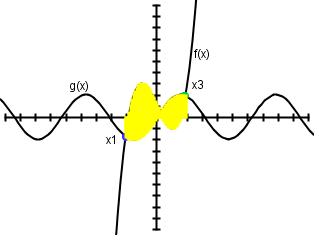
Find the area of the two regions between the two curves
Back to Homepage
Michelle M. Beckman
beckman.michelle@gmail.com
Updated December 11, 2008.
Using the TI-83 or higher, approximate f'(0.75) for f(x)= 0.5x3 + 2x + 0.69
Then calculate the actual value of f'(0.75) and compare this with the approximation.
First graph f(x)= 0.5x3 + 2x + 0.69
- Press Y= key.
- Type in the equation with the following keys: . 5 X ^ 3 + 2 X + . 6 9
- Press the ZOOM key and hit 6 for zoom standard. The graph should appear and look something like this:
Approximate f'(0.75) on the calculator
- Hit 2nd MODE to go back to the home screen.
- Press MATH and 8 so you have the nDeriv( on your home screen.
- Press the VARS key, scroll right to Y-VARS, press 1 and press 1 again to select the Y1 function we entered.
- Now enter , X , 0 . 7 5 , 0 . 0 0 0 1 ) and hit ENTER.
- The calculator has approximated the value of the derivative of f(x) at the point x = 0.75 to be ~2.843750005
- Find f'(x) by using the Chain Rule: f'(x) = 1.5x2 + 2
- Graph this function along with the original by pressing Y= again, and entering 1.5 X ^ 2 + 2 next to Y2=.
- Then hit the GRAPH key. The graph should look something like this:
Calculate the exact value of f'(0.75)
- Plug 0.75 into the derivative equation: f'(0.75) = 1.5 (0.75)2 + 2 = 2.84375
- Compare this with the approximation: Pretty darn close!!!
--------------------------------------------------------------------------------------------------------------------------------------------------------------------------------------
Integrals:
Using the TI-83 or higher, find the area between the curves f(x)= x3-3x +1 and g(x)= 2sin(x).
First graph f(x) and g(x)
- Press Y= key.
- Type in f(x) next to Y1= with the following keys: X ^ 3 - 3 X + 1
- Type in g(x) next to Y2= with the following keys: 2 SIN X )
- Press the ZOOM key and hit 6 for zoom standard. The graph should appear and look something like this:
Find the solutions to the system of equations; in other words, find where the functions intersect
- Press 2nd CALC (TRACE key).
- It will ask for the first curve, so move the cursor close to the first intersection point. Press ENTER.
- On the other curve move the cursor close to the intersection, and press ENTER again.
- To guess the intersection point, press ENTER one more time. The
coordinates of the point are displayed on the screen.
- Repeat steps 1-3 to determine the other two points of intersection.
x1 = -2.0788
x2 = 0.2022
x3 = 1.8678
Find the area of the two regions between the two curves
- Hit 2nd MODE to go back to the home screen.
- For the left region, subtract the integral of g(x) from f(x) from x1 to x2.
- Press MATH 9 and fnInt( will appear. Press the VARS key, scroll right to Y-VARS, press 1 and press 1 again to select the Y1 function we entered.
- Now enter , X , -2.0788 , 0.2022 ) followed by the minus sign -
- Repeat step 3 but enter the Y2 function instead of Y1 (press Y-VARS, 1, 2). Then enter , X , -2.0788 , 0.2022 ) and ENTER.
- This is the area for the left-most region is ~ 6.9657
- For the right region, subtract the integral of f(x) from g(x)
from x2 to x3.
- Repeat the same procedure above to find this area. This time use fnInt(y2, x, x2, x3) - fnInt(y1, x, x2, x3).
- The area for the right-most region is ~3.0084
Back to Homepage
Michelle M. Beckman
beckman.michelle@gmail.com
Updated December 11, 2008.